
Introduction
Using online gaming platforms on a smartphone or computer involves more than simply opening a website or application. Internet connectivity, available device storage and overall system performance can all influence the browsing experience.
Many users focus on platform features but overlook how their devices handle online activities. Understanding these basic technical factors can help prevent unnecessary interruptions and improve everyday device management.
In this Raja Game guide, we will explore internet data usage, storage management, mobile performance and practical ways to maintain a smoother online experience.
Understanding Internet Data Usage
Internet data usage refers to the amount of mobile or broadband data consumed while accessing websites, applications and other online services.
Different online activities require different amounts of data. For example, loading text-based pages generally uses less data than viewing high-resolution images or streaming videos.
When exploring Raja Game or similar online platforms, data consumption may depend on several factors:
- Website content and page size.
- Images and multimedia elements.
- Internet connection quality.
- Background applications.
- Browser activity and cached resources.
Understanding these factors can help users manage their internet plans more effectively.
How Mobile Data Affects Online Gaming
A stable internet connection is important for accessing online platforms. However, the type of connection and available network speed can influence the overall experience.
Mobile data connections may experience interruptions depending on network coverage, signal strength and location.
Wi-Fi connections can provide another option for users who prefer browsing without using their mobile data allowance.
Here are some simple suggestions:
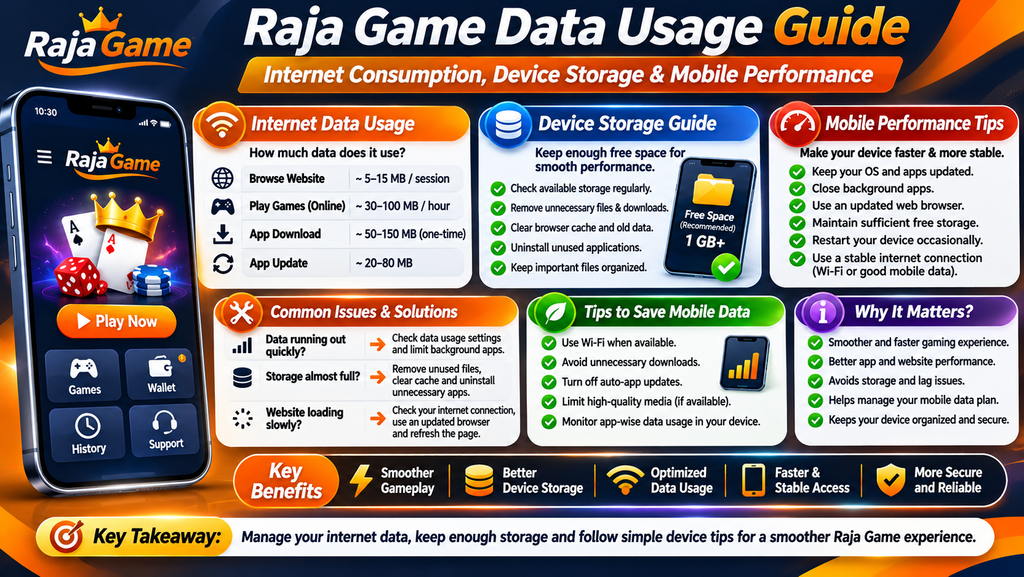
- Check your available data balance regularly.
- Use a reliable internet connection.
- Avoid unnecessary background downloads.
- Monitor applications that consume large amounts of data.
- Be careful when using public Wi-Fi networks.
Managing Device Storage Effectively
Device storage is another important factor that can influence smartphone performance.
When storage becomes limited, applications may take longer to open, and certain device functions may become less responsive.
Users can maintain available storage by following a few basic practices.
Remove Unnecessary Files
Old downloads, duplicate images and unused documents can occupy valuable storage space. Review these files periodically and remove items you no longer need.
Clear Unnecessary Browser Cache
Browsers store temporary website information to improve loading performance. However, cached files may sometimes occupy considerable storage.
Clearing unnecessary cached data can help resolve certain browsing issues.
Review Installed Applications
Check your installed applications and remove those you no longer use. Keeping your device organized can make storage management easier.
Keep Important Files Organized
Use appropriate folders to organize documents, photos and downloads. This makes it easier to identify unnecessary files when storage becomes limited.
Tips to Improve Mobile Device Performance
A smartphone’s performance depends on its hardware, software and available resources.
If your device feels slow while browsing online platforms, consider these practical suggestions:
- Keep your operating system updated.
- Close applications running unnecessarily in the background.
- Maintain sufficient free storage.
- Use an updated web browser.
- Restart your device occasionally.
- Avoid installing applications from unknown sources.
- Check your internet connection when pages load slowly.
These habits can help maintain a more reliable mobile browsing experience.
Common Data and Storage Problems
Users may occasionally experience technical issues related to internet connectivity or device resources.
1. Internet Data Running Out Quickly
Some websites and applications use more data because of images, videos and background activity.
Review your device’s data usage settings to identify which applications consume the most internet data.
2. Smartphone Storage Almost Full
When storage becomes limited, remove unnecessary downloads and unused applications. Back up important files before deleting anything.
3. Website Loading Slowly
Slow loading may be related to network conditions, browser problems or temporary website issues.
Check your connection and try using an updated browser.
4. Applications Becoming Unresponsive
Too many background applications or limited available memory can sometimes affect device responsiveness.
Close unnecessary applications and restart your device if required.
Why Regular Device Maintenance Matters
Regular maintenance helps users understand how their devices are performing and identify potential problems early.
Instead of waiting until a smartphone becomes extremely slow, users can periodically review storage, internet consumption and software updates.
A properly maintained device can provide a more convenient experience when browsing different websites and using online services.
Online Safety While Managing Data and Applications
Device management should also include basic online security practices.
Download applications only from trusted sources and carefully review permissions before installing new software.
Avoid unknown APK files, suspicious download links and websites requesting unnecessary personal information.
When using Raja Game or any other online gaming platform, verify the website address before entering account information.
Never share your password, OTP or sensitive financial information with unknown individuals.
Frequently Asked Questions
1. What is Raja Game data usage?
Raja Game data usage refers to the internet data consumed while accessing the website or related online services. Actual consumption depends on the content loaded and the user’s browsing activity.
2. Does online gaming consume mobile data?
Online gaming activities can consume mobile data. The amount depends on the platform, game type, multimedia content and connection requirements.
3. How can I reduce mobile data consumption?
Monitor background applications, avoid unnecessary downloads and use Wi-Fi when appropriate.
4. Does low device storage affect website performance?
Limited storage can affect overall device performance and may contribute to browsing difficulties, particularly on devices with fewer available resources.
5. How often should I clean my smartphone storage?
There is no fixed schedule. Reviewing storage periodically and removing unnecessary files when required is a useful habit.
6. Why does my browser become slow sometimes?
Possible reasons include outdated browser software, excessive cached data, limited device resources or an unstable internet connection.
Conclusion
Managing internet data and device storage is an important part of maintaining a reliable online experience. Small habits such as reviewing data consumption, removing unnecessary files and keeping software updated can make everyday browsing more convenient.
For users exploring Raja Game and other online platforms, understanding basic device management can help reduce common technical difficulties.
Always prioritize device security, use trusted applications and maintain control over your internet usage. A well-managed smartphone or computer can make online activities easier and more organized.