
Online gaming platforms often include different visual elements that help users understand what is happening on the screen. These may include icons, symbols, labels, menus, game descriptions, and other information. For someone exploring a platform for the first time, understanding these elements can make the overall experience easier to follow.
Raja Game is a name associated with online gaming-related platforms. Before exploring any game, users should take time to understand the information presented on the website and within individual game screens. This guide explains how to recognize common interface elements and why paying attention to them is important.
1. What Is a Game Interface?
A game interface is the visual area through which users interact with a game. It can include buttons, icons, instructions, images, symbols, and different information panels.
The appearance of an interface can vary depending on the game category and platform. Some games use simple layouts, while others contain several sections and visual indicators.
Understanding the interface helps users identify important information without becoming confused by unfamiliar elements.
2. Understanding Common Game Icons
Icons are small visual symbols used to represent different actions or information. They are commonly displayed near buttons, menus, and game sections.
Some frequently used examples include:
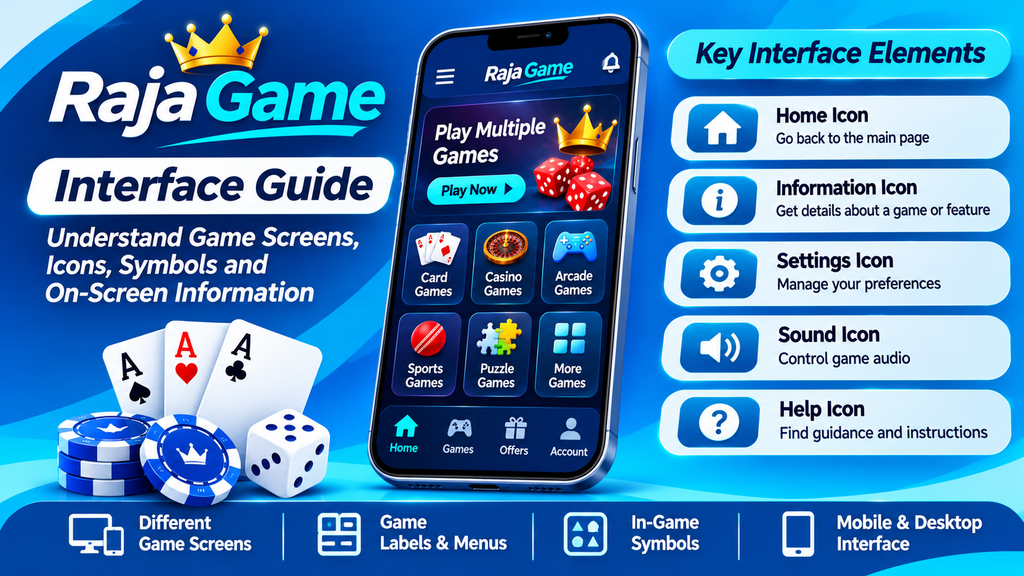
- Home icon: Usually represents a way to return to the main page.
- Information icon: May provide additional details about a feature or section.
- Settings icon: Often represents customisation or display preferences.
- Sound icon: May indicate audio controls.
- Help icon: Can provide explanations about interface elements.
The meaning of an icon can differ between platforms. Users should read nearby labels or available explanations instead of assuming that every symbol has the same function.
3. Reading Game Labels and Screen Information
Game labels provide short descriptions of different sections or features. They help users understand what a particular area represents.
For example, a game screen may contain a title, category name, available instructions, visual indicators, or other descriptive information.
It is useful to read these labels carefully before selecting an option. This simple habit can help prevent misunderstandings and make unfamiliar interfaces easier to explore.
4. Understanding Visual Symbols During Gameplay
Different games may use symbols to represent objects, actions, categories, or game-specific information. Their meanings depend on the individual game.
A symbol used in one game may have a completely different meaning in another. Therefore, users should refer to the relevant game instructions whenever a symbol is unfamiliar.
Avoid making decisions based only on colours, shapes, or visual appearance. Understanding the meaning behind a symbol is more useful than guessing its purpose.
5. Why Game Screen Layouts Can Be Different
Not every online game follows the same screen design. The layout often depends on the type of game, its interface requirements, and the device being used.
For example:
- Card-based games may display cards and related visual information.
- Arcade-style games may use movement indicators and action buttons.
- Puzzle games may display grids, shapes, and progress elements.
- Sports-related games may include scores, team details, or match information.
These are general examples of interface designs. The actual elements available depend on the particular game.
6. Tips for Understanding an Unfamiliar Game Screen
When exploring a new game, it is better to spend a few moments understanding the screen rather than selecting options immediately.
Consider these simple tips:
- Read the game title and category before continuing.
- Look for instructions or information sections.
- Check the meaning of unfamiliar icons and symbols.
- Understand what the visible buttons are intended to do.
- Avoid clicking unfamiliar options without understanding them.
- Review the game’s terms and conditions before participating.
Following these steps can make the interface easier to understand, especially for people who are new to online gaming platforms.
7. Mobile and Desktop Interface Differences
A website may display its interface differently on mobile phones, tablets, and desktop computers. Mobile screens usually have less available space, so some elements may appear in a different position.
On a desktop, users may see wider information panels and additional visual sections. On a mobile device, menus and buttons may be arranged vertically or placed inside compact sections.
If an element looks different on another device, check whether the website provides a responsive layout or device-specific instructions.
8. The Importance of Understanding Information Before Playing
Visual elements are not only part of the design. They can also communicate important details about a Raja game.
Users should understand the available information, including participation conditions, potential costs, and relevant risks, before taking part in any activity involving money.
Never assume that a visual indicator guarantees a particular result. Outcomes can be uncertain, and users should avoid making financial decisions based on symbols, colours, or interface displays.
9. Explore Raja Game Information Carefully
When exploring Raja Game, users should focus on understanding the available website information and the purpose of different visual sections. Reading descriptions and checking the meaning of interface elements can help make the browsing experience more informed.
It is also important to verify that the website being accessed is the intended and legitimate service. Similar names or branding may appear across different online platforms, so checking the website address and its terms is a sensible precaution.
Conclusion
Understanding game screens, icons, symbols, and labels is a useful part of exploring any online gaming platform. Each game may have its own visual design, so users should take time to read the available information instead of making assumptions.
This Raja Game interface guide provides a basic introduction to common visual elements and explains why understanding them matters. A careful approach, awareness of potential risks, and responsible participation can help users make more informed decisions when exploring online gaming content.